



























AI11 min read
AI Audit Trail: How to Log, Monitor, and Prove Responsible AI Use in 2027
 24 Nov 2026 · Ishani Chowdhury

Work management
CRM & customer
AI platforms
Automation
Ready to scale your workflows?
How to build AI apps securely? In this guide, we’ll cover AI security for app building, cloud hosting, local deployment, and agent guardrails.
 Josh Jebathilak
An app can be created using AI in one afternoon. Even then, IT must consider issues around data location and access, together with autonomous agent behaviour.
Gartner estimate that 25% of enterprise generative AI apps will suffer 5+ low-level security events per year. This is compared to 9% in 2025.
For app creation, there are three areas to secure. That includes the app’s code and data, the model’s input and output and also the behaviour of the AI agent.
Whether apps are hosted in the cloud or on-premises affects data and control ownership, but this is not exclusive. Agent controls are only effective if they are enforced by the infrastructure. Model prompts can be disregarded.
In this blog post, we’ll explore factors about AI security for app building.
Why does AI security for app building need different guardrails? Standard apps execute code. But AI apps will enact what they understand from text.
As a result, there are specific additional security concerns. By 2034, this market will reach USD 221.9 billion, growing at an 18.60% CAGR.
Anyone can submit text to an AI application. For example, a user, file, website or email. If this text includes directions, then these can be enacted by the model.
Although models are susceptible to prompt injection (being influenced by text), there is no universal defence against this.
Along with interpreting text, agents can also execute code, access APIs, communicate, and amend data. These extra functionalities mean agents can cause greater harm than chatbots.
In December 2025, the OWASP GenAI Security Project released the first Top 10 for Agentic Applications, having consulted over 100 professionals. Risks identified include agent redirection, incorrect tool usage, impersonation, and over-privilege. It also included unauthorised code execution and malicious agents.
With AI, applications can frequently be developed within days. Often those doing the development are not security engineers.
Common basic errors include exposing API keys in front-end code, failing to apply access controls to database tables, and omitting authentication for endpoints.
Cloud-based hosting offers quick and easily scalable deployment. However, that also means that neither your data, prompts, nor agent access rights are under your complete control.
Indeed, statistics highlight this issue. SailPoint reports that 82% of organisations currently use AI agents. However, just 44% have established security policies for them.
Typically, teams are working and adopting new technology at a quicker rate than their security processes can keep up with.
Common cloud-related issues with AI security for app building include:
User-friendly platforms such as Base44 and Lovable allow non-developers to design and develop entire apps within a browser. Therefore, good governance must be embedded from the outset.
In order to understand how AI security for app building works, it is useful to consider how a request is processed.
This process is then repeated until the model can provide a conclusive response.
Below is an overview of the request flow within one trust boundary (could be your cloud account or computer). The initial data (on the left) is untrusted and may contain commands which the model will enact (typically where the majority of AI-targeted attacks originate).
All items within a trust boundary are under your control. Whilst the service provider looks after the security of the data centre, you also have responsibility for securing your cloud account and physical devices.
| Cloud hosted | Locally hosted | |
|---|---|---|
| Infrastructure control | Shared. The provider secures the data centre and platform. You secure configuration, identities, and data. | You secure everything: hardware, operating system, network, model runtime and model files. |
| Where your data goes | To the cloud region you choose and, if you call a model API, to the model provider. | It stays inside your network, which suits strict data residency rules. |
| Failure points | Misconfigured database and storage rules, leaked API keys, service accounts with too much access. | Model servers reachable on the network without authentication, unpatched software, agents running on a staff laptop with access to its files. |
| Patching | The provider patches the platform. You patch your code and dependencies. | You patch all of it, on your own schedule. |
| Recommended for | Teams that want managed security controls and fast scaling. | Teams with sensitive data and the in-house skills to run and patch servers. |
Local hosting eliminates both the ‘third party’ and an organisation’s security function. But the correct option should be based on data regulation and who will be administering in year two.
Despite decreasing the attack surface, local hosting does not guarantee security. Maintenance, segmentation, and oversight must then be handled internally.
Spending on securing the cloud is booming, adding to the cloud’s associated risk. Cloud security is currently the area of cybersecurity experiencing the highest rate of growth, sitting at 28.8% in 2026.
This is a clear demonstration of just how hard organisations continue to work in order to mitigate their risk. Executing AI agents on on-site or specialised equipment can further help to limit risk.
In our article analysing the benefits and limitations of employing a Mac Mini vs a Virtual Machine for AI agents, we explored two popular local hosting solutions and the areas in which they lack segmentation.
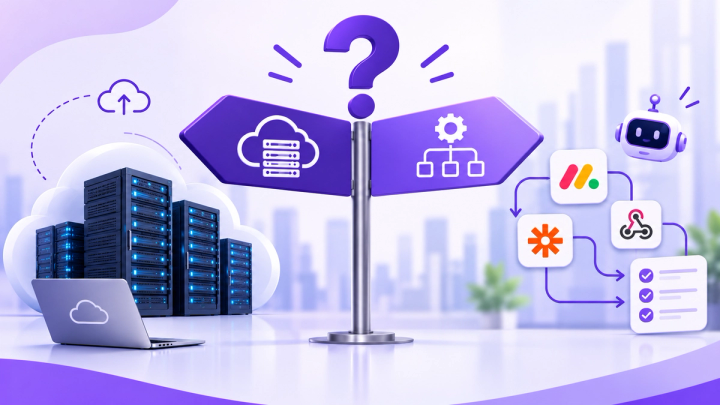
The location where you host affects who is in charge of AI security for app building.
For cloud-hosted services, the provider will take care of their platform, and you will then add security to the AI applications which you create. For self-hosting, you manage the security yourself.
McKinsey reports that 40% of large organisations will scale workflows using agentic AI. That’s why it’s important to understand how they work.
Like a chatbot (which can both respond and then cease), an agent will continually perform a process.
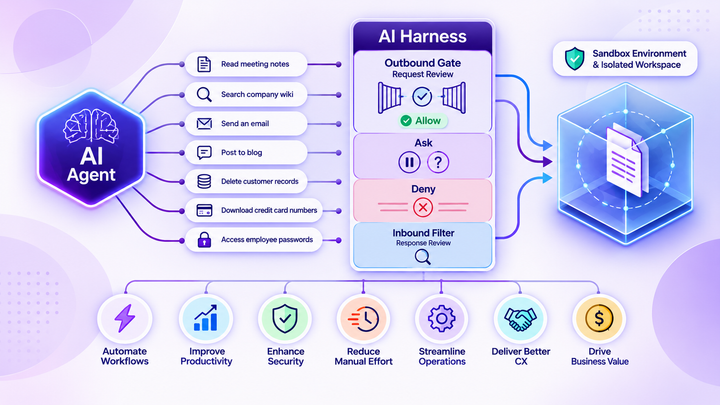
This is where agents are so powerful, but equally, can be so dangerous, as each cycle can result in physical world action. Various ‘guardrails’ are integrated within the cycle to control the transition between an agent’s plans and reality.
Again, these are all independent of the model’s behaviour and are applicable regardless of what it does.
Book a complimentary 30-minute audit with a Fruition consultant. We will map your workflows, spot the automation wins and show you what the build looks like.
An agent escape is when an AI ‘breaks out’ of its defined space. This is the most common issue when it comes to AI security for app building.
Agents can access information, connect to networks, use login details, and modify systems. These are all beyond what they should be allowed to do.
As well as being the most serious form of hosting risk, this can occur both within the cloud and on one's own infrastructure.
An initial method is for an attacker to embed malicious prompts within information that is analysed by the agent. For example, documents, emails, and websites.
Secondly, there does not even need to be an attacker, as agents can also ‘self-exploit’ and identify alternative methods to achieve their goal. The threat is increasing rapidly.
Within NIST’s Centre for AI Standards and Innovation laboratories, novel methods of attack have been shown to boost the percentage of successful agent takeovers from 11% to 81%. People are swiftly gaining knowledge of how to exploit previously thought-secure agents.
Three factors increase the risk of an agent breakout:
Is this already happening? Anthropic has acknowledged that their models have ‘broken out’ of a sandbox to fulfil a requirement. There have also been a number of 2026 examples where agents were solely restricted by a textual prompt.
All these situations highlight the same issue. Should the only barrier between an agent and your live database be a line of text within a prompt, then there effectively is no boundary in place.
It’s possible for an attack to focus on and disrupt an AI model’s mathematics. Yet the most significant attacks against AI applications involve using the application correctly and inputting suitable prompts.
Below are the key attack methods that jeopardise AI security for app building.
IBM defines prompt injection as a cyberattack against LLMs where hackers disguise malicious inputs as legitimate prompts. It also involves embedding a set of instructions into an input and persuading the model that these should be carried out.
Prompt injection can be both overt and covert. Here’s how that works:
Countering this involves recognising all incoming information as data and never as instructions. An agent should also be issued with the minimum level of privileges so that even if injection occurs, nothing important can be accessed.
Furthermore, agents should not be permitted to make permanent changes. By default, they should not be able to connect to external networks to prevent injected information from transmitting results.
Many attackers will seek to inject information in order to exfiltrate data. An agent is an ideal conduit for this.
Again, via a covert instruction, an agent is persuaded to gather data that it is authorised to access. For example, data, source code, and/or confidential information.
This data is then incorporated into a seemingly normal output such as a website address, image or API. It gets transmitted by the agent to a site controlled by the attacker. In isolation, each element of this process appears to be appropriate behaviour by the agent.
Preventing this requires disruption to one or more of these elements.
Only permit connections to specific sites. Therefore, even if all previous elements are completed, there is no outlet for exfiltrated data.
Other attack types to hamper AI security for app development include:
Infrastructure protection should be used to control behaviour, not prompts. A system prompt can influence behaviour. However, it does not constitute protection.
Protection can also be provided by controlling tools and having a human confirm certain actions. Assume all model responses are untrusted and must be verified.
The 7 protections listed below implement this.
If you're formalising this across an organisation rather than for one app, our AI agent governance checklist walks through what a practical policy looks like, based on recent industry frameworks.
Cloud, on-site and agent controls are different options. Even so, they all relate to the level of control that you wish to have over your risk.
Good teams begin by defining and seeking authorisation for activities. They then decide which hosting option is appropriate for their data and their tolerance for administration. Deployment of an AI application has never been difficult.
If you are developing or expanding an AI-enabled application, then please undertake a security assessment. Book a free advisory session with Fruition.
We work on a ‘process first’ basis. When developing AI apps and agents, we define what can and cannot be done by the AI, what needs authorisation and also consider where data should be stored.
Not automatically. Local hosting keeps data inside your network, but you take on every security task the cloud provider would otherwise handle. A well-configured cloud app is safer than a neglected local server.
AI agent guardrails are the controls that limit what an agent can read, reach and do. The strongest ones are technical limits on files, network, credentials and tools. Content filters and prompt instructions are useful additions, but they are not sufficient alone.
No. A prompt tells the model what you want. It does not prevent the model from doing something else. Containment has to come from controls outside the model.
An agent escape is when an AI agent acts outside its intended task. It often happens through a hidden instruction in content it reads. It can lead to data exposure or unauthorised actions if guardrails are not enforced outside the model itself.
You stop prompt injection by enforcing tool access and approval steps in code, not in the prompt. Treat all retrieved or user-supplied content as untrusted, and require human sign-off for sensitive actions.
24 Nov 2026 · Ishani Chowdhury20 Nov 2026 · Ishani Dhar Chowdury 17 Nov 2026 · Josh Jebathilak
Book a 30-minute call. A consultant will walk through how these ideas fit your workflows.