





















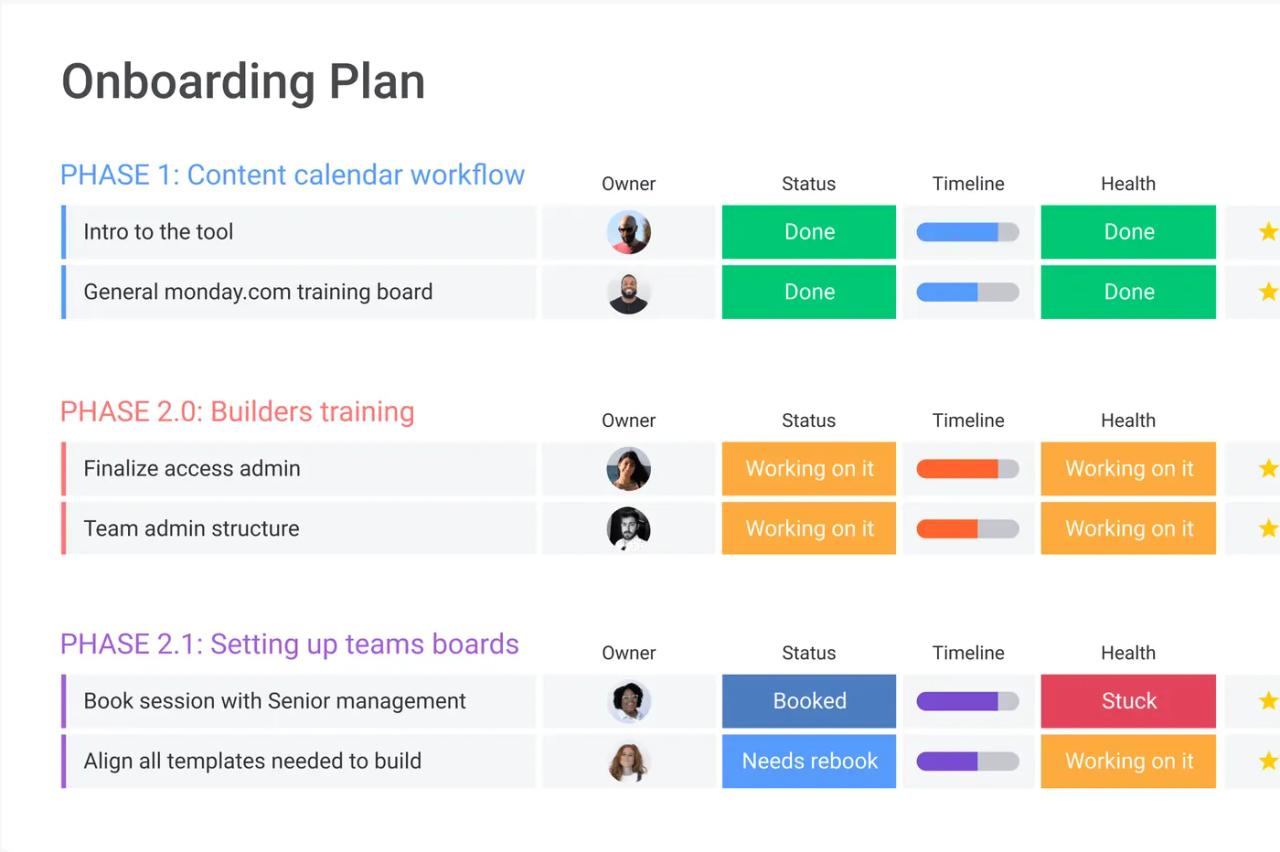
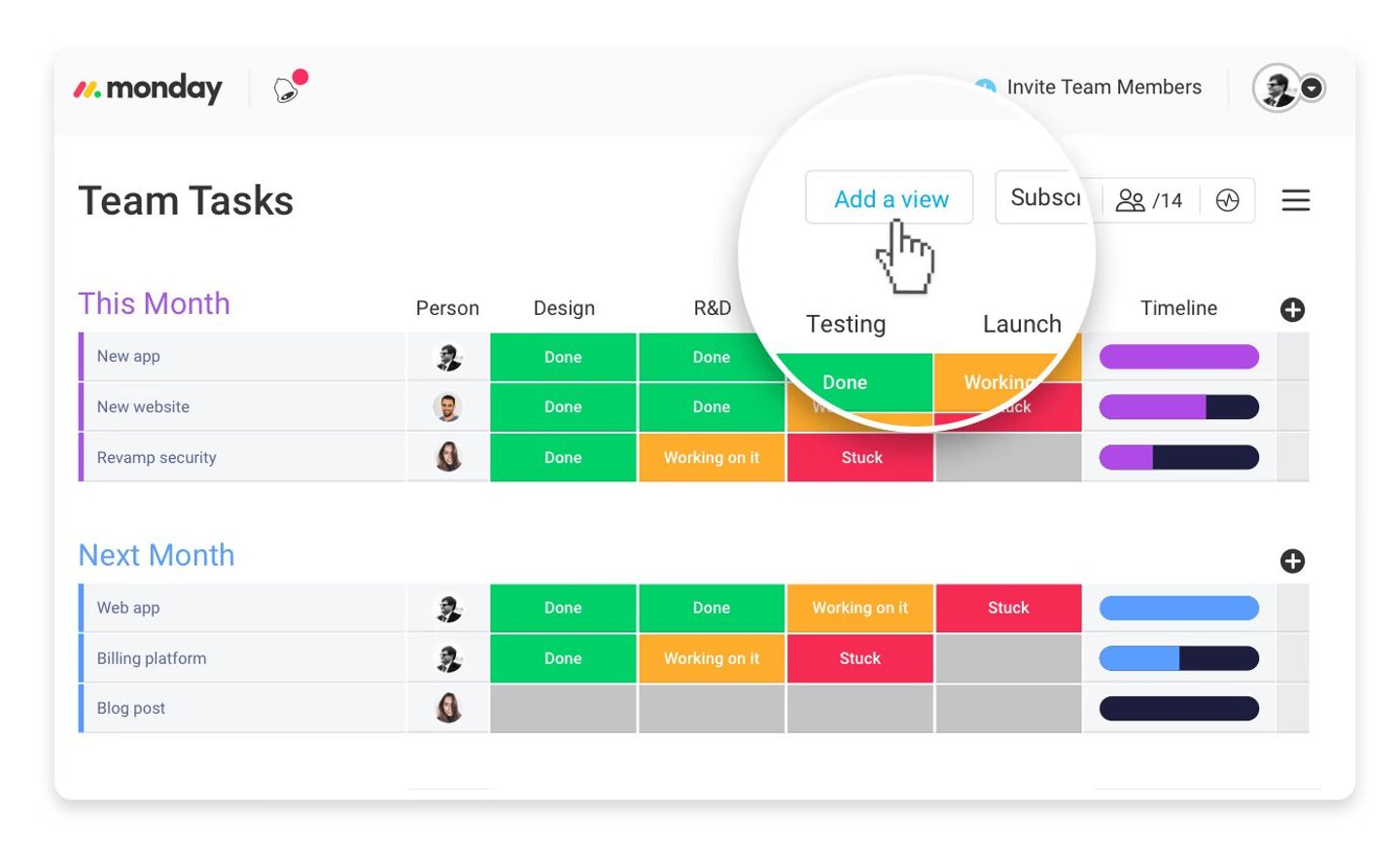
Run adoption as a phased training plan.
Training steps sit in phases with an owner, status, timeline and health, so progress and blockers are visible to everyone.

Work management
CRM & customer
AI platforms
Automation
Ready to scale your workflows?
Expert Workflow Training delivered by a certified monday partner. Our training and adoption programs help you onboard and adopt monday.com up to 10x faster.

monday.com implementations delivered across six markets.
Return on investment from monday.com.
Hours saved, in the same study.
Fewer meetings for teams on monday.com.
A selection of the organisations whose people we have trained and supported on monday.com.




See how one operations team moved its day-to-day work onto monday.com, with Fruition designing, building and rolling it out.
 Watch on YouTube
A free 30-minute session to find the skills gaps worth training.
Teams that teach themselves monday.com usually stop at the basics and build workarounds, so the platform never becomes the single source of truth.
Our certified trainers run role-based onboarding for leaders, project managers and daily users, so every team works the same way and adoption sticks.
Four parts of monday.com every trained team relies on.
Training steps sit in phases with an owner, status, timeline and health, so progress and blockers are visible to everyone.
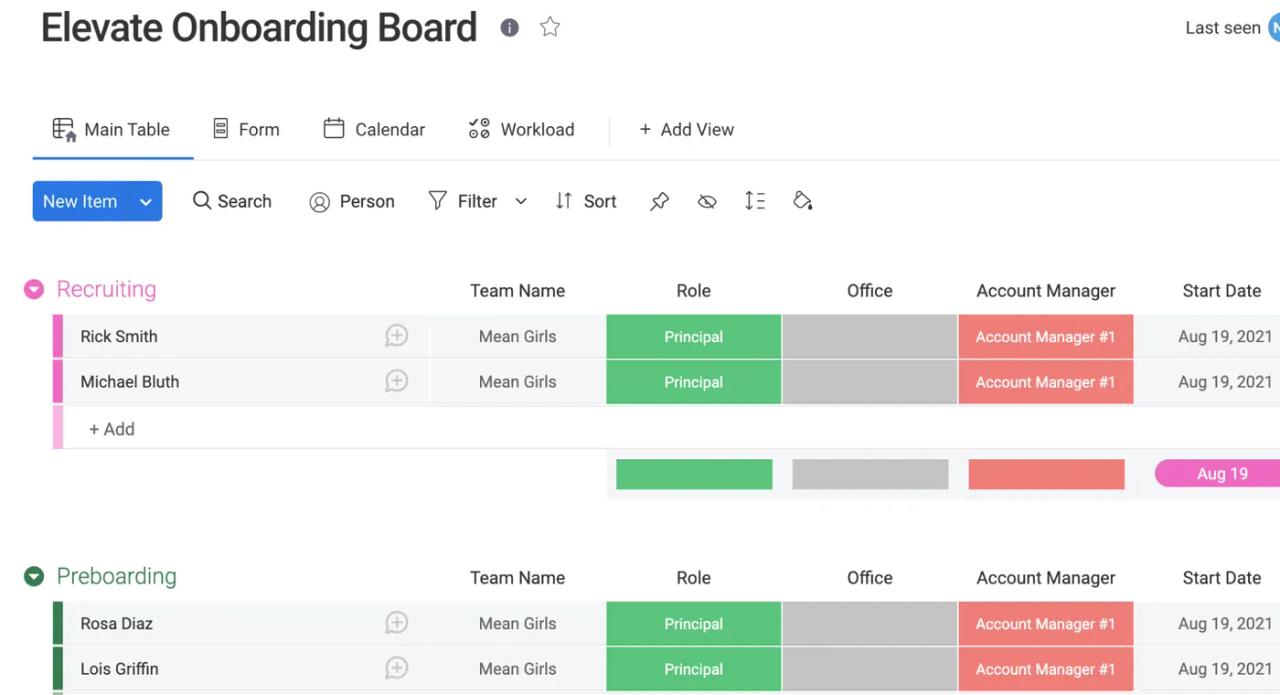
People move through recruiting, preboarding and onboarded groups with role and start date, and form, calendar and workload views.
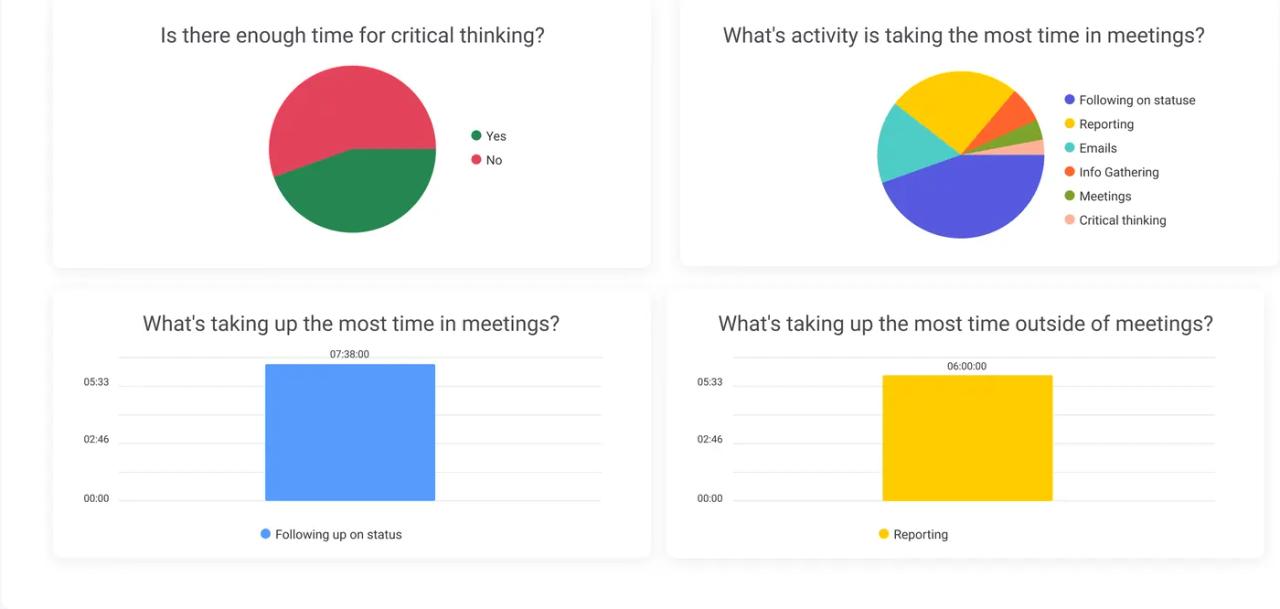
Dashboard charts turn board data into answers, such as where time goes in meetings, using the same widgets teams adopt for reporting.
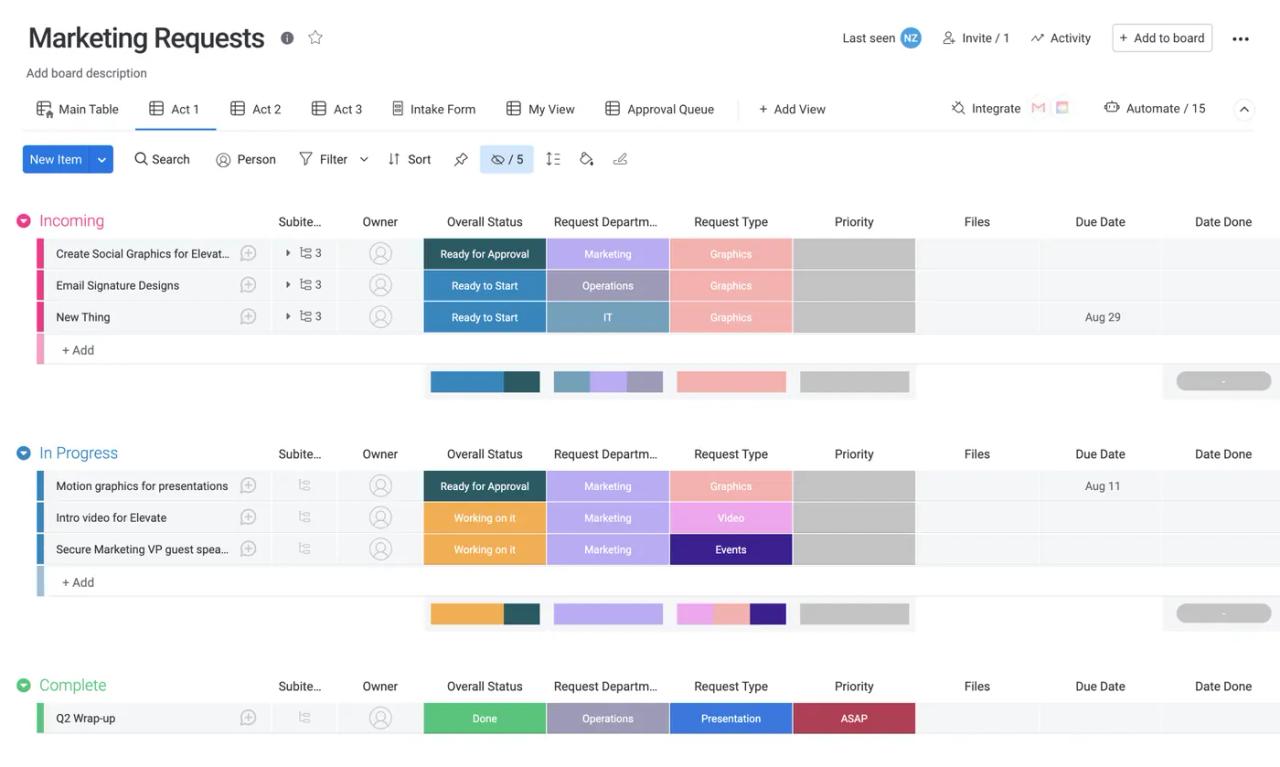
A requests board combines intake forms, an approval queue and automations, so routine hand-offs run without chasing.
Two client builds and what they changed.


A project management and cost consulting firm for construction programmes.


A multidisciplinary architecture and engineering firm working across Texas, New Mexico and Oklahoma.
Set your team size and workflow complexity for an instant recommendation.
Instructor-led sessions over one to two weeks.
Right for a single department onboarding together at pace.
Book a FREE Training ConsultationOperations and IT leaders on what changed after we mapped the process first.
“We are now utilising monday.com to its full potential, from lead through design and production teams - everyone knows what stage our projects are in, what's next and what our process is.”

“monday.com has given us the visibility we need to get everyone on the same page and keep track of all the moving parts.”

“What a pleasant and wonderful experience it was to be dealing with Josh and the fruition team. It made it a smooth and easy process for us and our team. They were all very professional and great to speak with. Looking forward to working again with you in the future.”
“We found Monday to be more customisable and transparent for both internal and external stakeholders. It reduced double handling of issues, as the Monday boards provide clear, accessible information, eliminating the need to email around for updates.”

“The monday.com mobile app gives our technicians on raw construction sites instant access to the project information they need and makes connecting with the team at HQ easy.”

“Process automation across campaign management, budget management and project approvals has saved significant amounts of time for staff globally and also improved collaboration across global teams.”

“This system will save hundreds of thousands of dollars a year guaranteed.”

“A big thanks to Josh - spent a couple of hours working through ways to get our Event Project Plan on Monday into good shape. We know have a much more user friendly and useful Project Plan and we have made use of a variety of different automations to streamline processes. When our NFP is ready to undertake more complex Monday activities I will definitely be looking to Fruition for support.”
“Fruition have been instrumental in moving us to a 'single source of truth' system for managing sales and projects.”

“Since implementing monday.com, CLSQ has experienced a significant transformation in operational efficiency.”

“We are very Happy Little Campers, and our system is easy to use, portable, flexible and very informative and gives us a great insight to ALL facets of the business and where our communication and marketing efforts are best targeted to maximize our returns for effort. I would highly recommend you have an initial chat with these guys. They know their stuff.”

“Zach provided excellent training on Monday.com and he included some great insights on how we can best use the project management features. Thank you!”

“The Fruition team helped me get the most out of monday.com. They provided me with in depth instruction, custom templates and helped me solve problems unique to our early stage company's needs.”

“Josh and the Fruition team were an absolute pleasure to work with. They were professional, knowledgeable, and made the whole process smooth and straightforward. I would highly recommend them to anyone looking for quality software solutions.”
“Josh and his team were excellent from start to finish on building our monday.com integrations and automations. Very happy with them.”

“Having experienced working with Josh directly at monday.com, I'd have no hesitation recommending Josh in any consulting engagement.”

“Couldn't be more happier. Thank you Josh for your hard work and commitment. Highly recommend!”

“Josh & the Fruition team were great to deal with and very thorough. would highly recommend!”

Training is shaped around leadership, project managers and daily users, so each group learns what its role needs.
High-level data views for decision makers.
Hands-on workflow and automation design.
Practical execution training for adoption.
Tell us about your team and the workflows you want to master, we’ll tailor the session live on the call.
Yes, monday.com does have training programs, and they’re offered in a few different formats depending on your needs:
- Monday Academy (Free)
Online learning platform with self-paced video courses and certifications. Covers everything from beginner basics to advanced automations and integrations. Includes role-specific paths (e.g., project managers, admins).
- Live Webinars (Free & Paid Options) Monday.com regularly hosts webinars with live Q&A. Topics include “Getting Started,” “Automations Deep Dive,” and best practices for workflows.
- Customer Success Programs (For Teams & Enterprises) Dedicated onboarding and tailored training sessions provided for paying customers, especially on Pro and Enterprise plans. These are personalized to your company’s workflows and often led by a Monday.com consultant.
- Monday.com Partners & Consultants (Paid)
Certified partners around the world offer private training, implementation support, and advanced setup. Useful if you need deep customization, third-party integrations, or in-person training.
- Help Center & Community (Free)
Step-by-step guides, templates, video tutorials, and an active user forum for ongoing learning.
Yes, monday Academy is completely free to all monday.com users.
Basic training can take a few hours. Becoming fully proficient with advanced automations and integrations may take a few weeks, depending on your use case.
Yes. Training can be tailored for individuals, small teams, or company-wide onboarding.
Yes. It integrates with tools like Slack, Microsoft Teams, Gmail, Google Drive, Zoom, HubSpot, and more.
Yes, monday.com does have training programs, and they’re offered in a few different formats depending on your needs:Monday Academy (Free)
Online learning platform with self-paced video courses and certifications.Covers everything from beginner basics to advanced automations and integrations.Includes role-specific paths (e.g., project managers, admins).Live Webinars (Free & Paid Options)
Monday.com regularly hosts webinars with live Q&A.Topics include “Getting Started,” “Automations Deep Dive,” and best practices for workflows.Customer Success Programs (For Teams & Enterprises)
Dedicated onboarding and tailored training sessions provided for paying customers, especially on Pro and Enterprise plans.These are personalized to your company’s workflows and often led by a Monday.com consultant.Monday.com Partners & Consultants (Paid)
Certified partners around the world offer private training, implementation support, and advanced setup.Useful if you need deep customization, third-party integrations, or in-person training.Help Center & Community (Free)
Step-by-step guides, templates, video tutorials, and an active user forum for ongoing learning.
Yes, monday.com is an excellent project management platform that supports both waterfall and agile methodologies. monday.com Work Management provides comprehensive project portfolio management capabilities, allowing teams to efficiently manage portfolios, projects, and tasks in one centralized workspace.
The platform offers robust project management features including:
Whether you’re managing a single project or multiple project portfolios, monday.com’s flexible work management platform adapts to your team’s specific project management methodology and workflow requirements.
monday.com Work Management is a cloud-based platform that helps teams plan, organize, and track their work in one centralized workspace. It offers customizable boards, task automation, and powerful integrations to streamline workflows across any industry.
Yes, monday.com is a comprehensive Project Portfolio Management (PPM) tool. In October 2024, monday.com launched monday.com Portfolio as part of their Enterprise-level offering, establishing the platform as a robust PPM solution for organizations managing multiple projects and portfolios.
monday.com Portfolio delivers advanced PPM capabilities including:
This Enterprise PPM solution transforms how organizations manage project portfolios by automating reporting workflows, maintaining project interdependencies, and providing strategic oversight. With monday.com Portfolio, project managers and executives can finally say goodbye to manual project updates and embrace data-driven portfolio management at scale.
Yes! Monday.com is fully customizable. You can build boards, workflows, and dashboards tailored to your team’s unique processes, whether you manage projects, sales pipelines, marketing campaigns, or operations.
Monday.com uses industry-leading security measures, including SOC 2 Type II compliance, GDPR compliance, data encryption, and role-based permissions. This ensures that your company data remains safe and protected.
The five stages of project management form the essential project management lifecycle that guides successful project delivery from start to finish. These project management phases provide a structured framework for managing projects of any size or complexity:
These five project management stages ensure systematic project delivery, effective resource management, and successful project outcomes while maintaining quality standards and stakeholder satisfaction throughout the project lifecycle.
monday CRM allows you to have full control over your sales pipeline, manage your contacts, streamline your post sales processes and sales enablement, all while seeing the big picture at a glance. With monday CRM, you can manage all aspects of your sales cycle and customer data in one central place. Fitted with multiple unique features created just for CRM teams, monday CRM can be used to fit all of your teams’ needs.
Yes, monday.com can be a great CRM tool, particularly for businesses that value flexibility, customization, and ease of use. Key features that make monday.com a great CRM tool include contact management, pipeline management, automation, and customisation.
If your priorities include rapid implementation, extensive customization capabilities, and maintaining a unified workspace, then monday CRM delivers excellent value proposition.
Do enterprise-level organizations implement monday.com? Absolutely, numerous Fortune 500 companies utilize monday.com for their operational management requirements. monday.com reports that over 180,000 businesses internationally rely on their platform, including recognized brands like Nissan, Elal, Zippo, Canva, Coca-Cola, Wix, and Uber.
While Monday.com provides specialized CRM packages, these aren’t offered at no cost. Nevertheless, their ‘Free Forever’ option remains accessible through standard work management subscriptions.
monday CRM provides comprehensive oversight of your sales funnel, contact database management, streamlined post-purchase workflows, and sales enablement tools, while delivering executive-level visibility across operations. Through monday CRM, you can coordinate every element of your sales process and customer information within a single unified platform. Equipped with specialized features designed specifically for sales teams, monday CRM adapts to meet all your department’s operational requirements.
monday.com and Salesforce serve different market segments with distinct capabilities. Although both platforms provide project management and CRM functionality, they address unique business requirements with separate strengths. Salesforce operates as an enterprise-grade CRM solution ideally designed for large corporations with sophisticated needs, whereas monday.com excels through its intuitive interface, adaptability, and implementation simplicity, positioning it perfectly for SMBs requiring powerful yet expandable solutions.
Hubspot is a great tool for Marketing teams, but it lacks in CRM and Project Management capabilities. We have also found from our clients who have switched over to monday.com with our services that they saved on technical administration costs with monday.com due to the cost to develop on Hubspot.
Zoho is a cheaper CRM alternative, making it great for teams who are looking for a basic CRM that they don’t plan on changing as their business evolves.
Another key factor that pushed our clients to migrate off of Zoho CRM to monday CRM is due to Zoho’s limited support. Zoho also asks you to pay 20-25% in addition to licenses for support, whereas with monday.com, you can manage the entire system and make changes with some training. monday.com vendor support is available 24/7 and completely free.
monday.com serves as an excellent CRM solution, especially for organizations prioritizing adaptability, customization capabilities, and user-friendly operation. Essential capabilities that establish monday.com as an outstanding CRM platform include contact database management, sales pipeline oversight, workflow automation, and extensive personalization options.
What drives monday.com’s widespread adoption? Monday.com’s market success results from its accessible interface design, visual attractiveness, and robust functionality addressing diverse operational management requirements. The platform gains recognition for its adaptability, configurable workflow systems, and seamless integration capabilities with multiple external applications. Additionally, monday.com features an aesthetically pleasing, intuitive architecture that facilitates team collaboration and project oversight.
Key benefits include:
monday CRM allows you to have full control over your sales pipeline, manage your contacts, streamline your post sales processes and sales enablement, all while seeing the big picture at a glance. With monday CRM, you can manage all aspects of your sales cycle and customer data in one central place. Fitted with multiple unique features created just for CRM teams, monday CRM can be used to fit all of your teams' needs.
On the Basic Plan, the monthly cost per user is $12 while the annual cost per user is $108. On the Standard Plan, the monthly cost becomes $14 per user while the annual cost per user is $144. On the Pro plan, it is $79.99 per user monthly and $228 per user annually.
monday service is an intuitive, fully customizable service platform where help desk teams manage and automate their service operations and processes to resolve incidents and requests within SLAs, and deliver great customer experiences at scale.
monday service connects ticketing, projects, and cross-department teams in one centralized support platform.
Yes, with monday.com, you can build a functional ticket-tracking system that helps your team's needs. You can track all incoming, open, and closed tickets with one comprehensive board. Connect channels to your monday Service "Tickets" board to receive all tickets in your board, and track correspondence within the ticket's item.
Learn more about using monday Service as a ticketing system here.
The best customer service ticketing system will have all of the following:User-Friendly Interface.Seamless Collaboration.Integration with Other Systems.Multi-channel support.Reliable and Robust Reporting.Scalability.Exceptional Customer Support.
Yes. It offers enterprise-grade security including SOC 2 compliance, GDPR, HIPAA (Enterprise), SSO, 2FA, and audit logs.
Handling IT tickets and service requestsAutomating incident management and approvalsTracking IT assets and change requestsProviding employees with a self-service portal for quick support
Yes. You can automate ticket routing, priority settings, status changes, SLA tracking, and escalations to reduce manual work and resolve issues faster.
Yes. It connects with Slack, Microsoft Teams, Gmail, Outlook, Jira, and more. You can also use the API, Zapier, or Make for advanced integrations.
On the Basic Plan, the monthly cost per user is $12 while the annual cost per user is $108. On the Standard Plan, the monthly cost becomes $14 per user while the annual cost per user is $144. On the Pro plan, it is $79.99 per user monthly and $228 per user annually.
Absolutely. Monday.com integrates with popular tools like Slack, Microsoft Teams, Google Workspace, Zoom, HubSpot, Salesforce, and more. These integrations ensure seamless data flow and keep your team connected.
Yes, monday has a dedicated CRM product. monday.com CRM is a flexible and highly customizable cloud-based CRM platform intended for businesses of all sizes.
Yes, monday.com has task management. Take a trial of monday work management and discover just how efficiently you can manage your teams’ to-do list.
Here are key factors that make monday.com so successful:
One of Monday.com's key selling points is its highly customizable nature, allowing users to tailor workflows, add automations, and integrate third-party apps.
Extremely use-friendly, making adoption easy
Highly visual, agile, and, most importantly, scalable
monday.com can be used to manage anything you want. It’s a veritable Swiss Army knife for managers around the world
monday.com is the most versatile project management software you’ll find on the market. You can use the platform to manage all of your projects, and also use it as a CRM, to manage your ad campaigns, track bugs, and manage video production.
A monday.com implementation with Fruition costs from $2,500 one-time for Training & Optimisation (1 team, up to 25 users), from $5,000 one-time for a Lock-Step build (1-2 teams, up to 50 users), or from $2,500 per month for a Deployed Engineer (multiple teams, up to 250 users). Prices are set in USD at the US team rate, shown here in your currency, and fixed before work starts. monday.com licences are paid separately.
Each service starts with a fixed-fee initial phase: outcome-based AI packages from A$5,000 (all under A$10,000), Atlassian from A$10,000, HubSpot from US$2,000, and automation and integrations from A$3,000 (shown here in your currency). Mid-scope projects are quoted after a scoping call, with local pricing in the UK and US.
Single-team implementations take 2–4 weeks; department-wide builds 4–8 weeks; enterprise deployments 8–16 weeks with phased rollout and training. Fruition works in fixed phases with defined outcomes so you always know what ships and when.
A Fruition monday.com implementation follows five steps: 1. discovery and process mapping, 2. configuration of boards, dashboards and permissions, 3. data migration and integrations, 4. role-based training, and 5. go-live and ongoing support. The solution design is signed off before anything is built.
Choose Training & Optimisation if you already use monday.com and need boards, automations and adoption fixed for one team. Choose Lock-Step if you are rolling out monday.com or rebuilding a core workflow for up to 50 users. Choose Deployed Engineer if several teams need ongoing builds, integrations and change requests.
Lock-Step includes mapping of 1-2 workflows, a signed-off solution design, up to 8 boards and 2 dashboards, up to 15 automations, 1 integration and 1 data import, 4 build sessions with your team, 3 training sessions, handover and admin documentation, and 30 days of go-live support.